OX586910

[LiDAX Ultra 1000 AWD] Cant create zones

I have problem creating zones, always says close map when done mapping, never gives me any save option.. custom mode activated but cant get more than one big zone for entire map. any suggestions?
Translate
You need to log in to reply. Login | Register

3 Comment

屏幕截图 2026-08-15 124628.png
Hello, please try creating zones again following these steps:
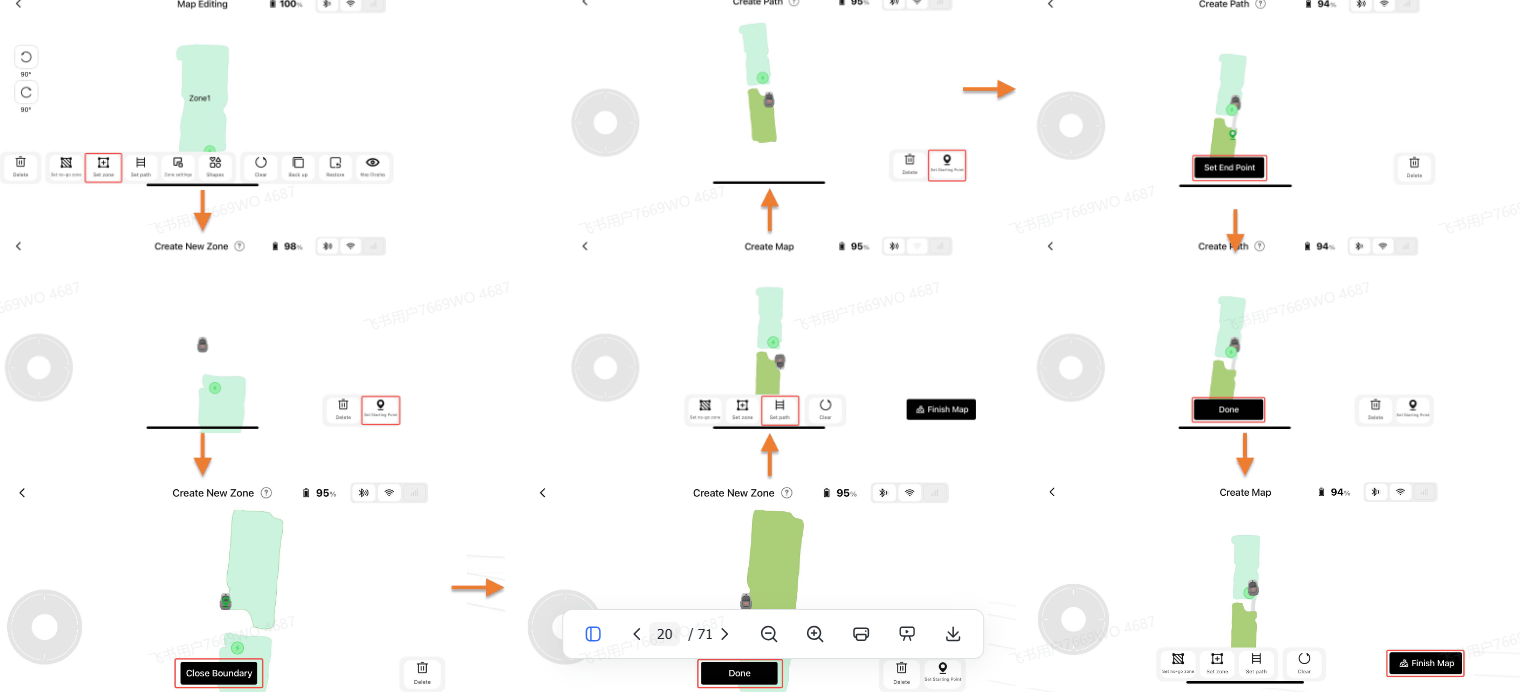
①Make sure your phone is Bluetooth‑connected to the robot. Drive the robot from the charging base to the lawn edge of your new target zone, tap “Set start point” in the APP. Manually steer the robot all the way around the edge of this new zone; the APP will render the zone outline in real‑time.
②When the robot returns close to the starting point, tap “Close outline” in the APP and your new zone will be finished. You may keep adding more zones or exit the creation process.
Tips:
1. All zones need to be connected by passable paths.
2. Do not let new zones overlap with existing ones. Overlapped areas will automatically merge into one single zone.
2026-8-15 05:45:05 GB Translate

OX586910Thread Starter
Hi again. Thanks for the response. But as soon as I have set starting point and driven around my intended zone it says close borders, and after that it just says zones will be put together. And then the new zone is gone. No matter where I start on my lawn... As I can see my map is one big zone 1 and I just can't add another one... I never get the option to save the new zone before message about merging together appears. Regards Magnus
2026-8-18 12:33:29 GB Translate

Please reread below tip 2 again:
Do not let new zones overlap with existing ones.
Overlapped areas will automatically merge into one single zone.
That means ... The real new zone have to be really separate area.
( Of course, now You could split that Your one big zone smaller areas. )
2026-8-18 15:56:10 GB Translate

UID:OX586910 GB
  • 2Posts
  • 0Friends

© 2026 MOVA Forum All Rights Reserved | Support by Discuz! X5.0 Font by MiSans

Quick Reply Back to Top Return to List