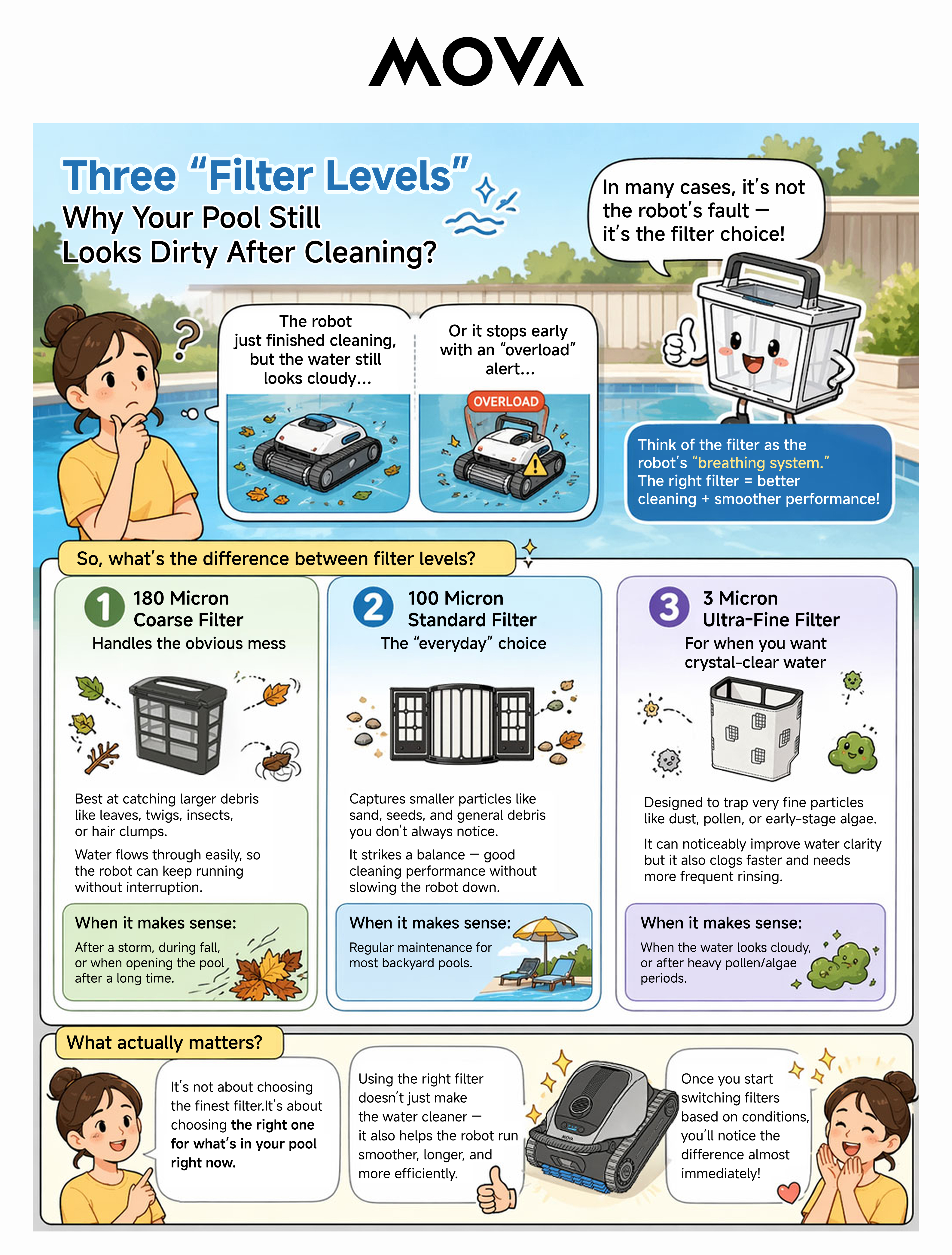
[Rover X10] Three “Filter Levels”: Why Your Pool Still Looks Dirty After Cleaning? |
| |
|
2026-8-8 16:10:29 Translate
and device SN via private message, and share your device to our account BD929781. Our technicians will inspect your robot.
2026-8-15 05:50
 GB
Translate GB
Translate
Hello, please go to [Smart Mopping Settings]‑[Bionic Edge Cleaning] in the APP and check whether [High‑frequency Mode] is selected.
Under high‑frequency mode, the mop arm swings outward frequently. Even in smart mode or normal mode, outward swing will still happen during zone cleaning or recall, which affects the swing interval.
After adjusting the setting, please trigger return‑to‑charge and check whether the robot can dock normally.
If the problem persists, please send us the fault video
2026-8-15 05:50
GB
Translate
|
|

 DE
DE
© 2026 MOVA Forum All Rights Reserved | Support by Discuz! X5.0 Font by MiSans


 4142
4142