GT453340

[Z60] Phantom Obstacles on Firmware 4.3.9_4650

Hello,

I have a MOVA Z60 Ultra Roller Complete and I am experiencing a serious navigation and obstacle detection issue.

The robot has started detecting phantom/invisible obstacles in completely clear areas where there is nothing physically blocking its path. It approaches an empty area, suddenly stops or changes direction, and starts avoiding an obstacle that does not actually exist.

Because of this, the robot sometimes takes incorrect routes and leaves areas uncleaned. In some situations, it also fails to properly detect real obstacles and may bump into them.

My current firmware version is 4.3.9_4650.

Could you please check:

1. Is this a known issue with firmware 4.3.9_4650?
2. Could this be related to the camera, AI obstacle recognition, or navigation system?
3. Is there a newer or beta/test firmware that fixes this issue?
4. If not, is it possible to downgrade or reinstall a different firmware version through technical support?
5. Would you like me to provide a video, logs, or other diagnostic information showing the phantom obstacles?

This issue significantly affects the robot’s navigation and cleaning performance.

Thank you for your assistance.
Translate
You need to log in to reply. Login | Register

4 Comment

上传问题日志.jpeg
共享设备.jpg
Hello, thank you very much for your detailed description of the phantom‑obstacle issue. We have recorded your firmware version 4.3.9_4650 and all symptoms.

Please kindly check the following points:

1. Check for dark‑colored, highly‑reflective or small objects such as table and chair legs in the surrounding area, which may cause abnormal detection. Please tidy up these items.
2. Regularly wipe the front laser sensor and camera with a soft dry cloth to remove fingerprints and dust.
3. Soft obstacles like curtains or half‑opened doors may trigger slow gentle collisions, which is normal behavior.
4. The robot supports OTA updates. We keep optimizing the obstacle‑avoidance performance, please check and install new firmware versions in time.

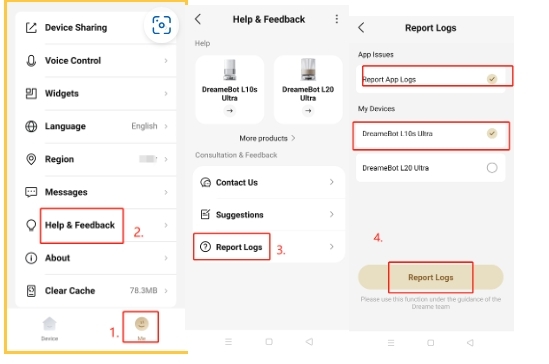
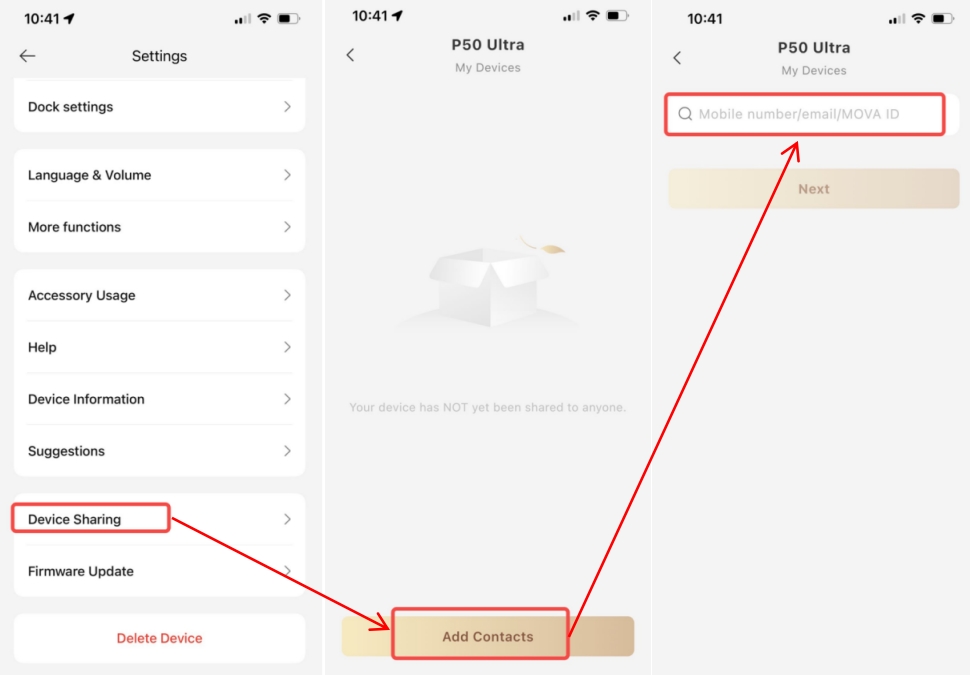
If the problem persists after these checks, please send us the fault‑reproduction video via private message, export and upload device logs, and share your device to our account BD929781.
Our R&D team will analyze the root cause after receiving your materials. As it is the weekend, our technical team will handle your case with priority on Monday.
2026-8-30 03:08:47 GB Translate

GT453340Thread Starter
IMG_1782.png
Greetings, I sent everything and did it according to your instructions, when should I expect an answer?
Good morning, thank you very much for your prompt reply. We failed to give you a full explanation. We need you to provide us with the video. Please send us the video via private message, together with the exact time when this issue occurred and your robot’s SN. Once you share the device with us, we will verify the situation as soon as possible. Looking forward to your reply.
GT453340Thread Starter
Hello, thank you for your reply.

The issue with the robot detecting phantom/invisible obstacles and attempting to avoid them has been present since I purchased the robot.

I have already shared the device with you through the MOVAhome app, so you should be able to access it and check the situation.

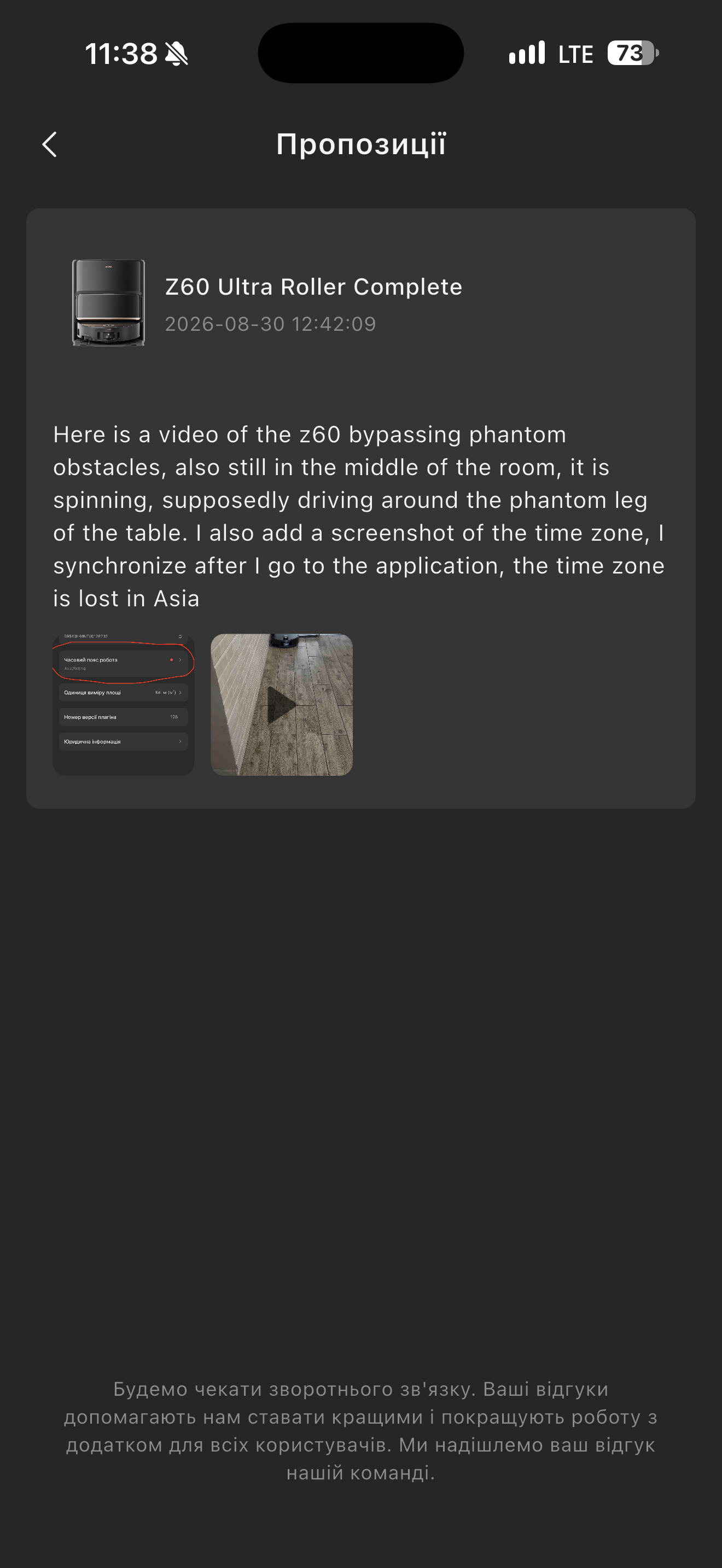
I have also uploaded the video in the MOVAhome app, in the “Suggestions” section. The video shows the robot detecting and avoiding obstacles that are not actually there.

Robot SN: R9540H61NEU0128233

There is also another issue with the MOVAhome app: the robot’s time zone keeps resetting to Asia/Beijing every time I re-enter the app/device settings. Because of this, the robot does not correctly understand when the scheduled Do Not Disturb / Quiet Mode should start and end.

I have attached a screenshot showing that the time zone is set to Asia/Beijing. Please check this issue as well.

Please investigate both issues, especially the camera/AI obstacle detection system and the time zone problem.

Thank you.
UID:GT453340 GB
  • 3Posts
  • 0Friends

© 2026 MOVA Forum All Rights Reserved | Support by Discuz! X5.0 Font by MiSans

Quick Reply Back to Top Return to List