Vicky

[V50 Ultra] Bug Report: Mova V50 Ultra Ignoring Custom Sequence and Mop Settings

​I am experiencing a routing and hardware issue with my Mova V50 Ultra robot vacuum. It is completely ignoring the customized room sequence and failing to attach its mop pads for the correct task.
​Issue Description:
I initiated a "Vacuum and Mop" run and set a specific, custom room sequence in the app:
​Bathroom 3
​Bathroom 2
​Hallway
​Master Bedroom
​Actual Behavior:
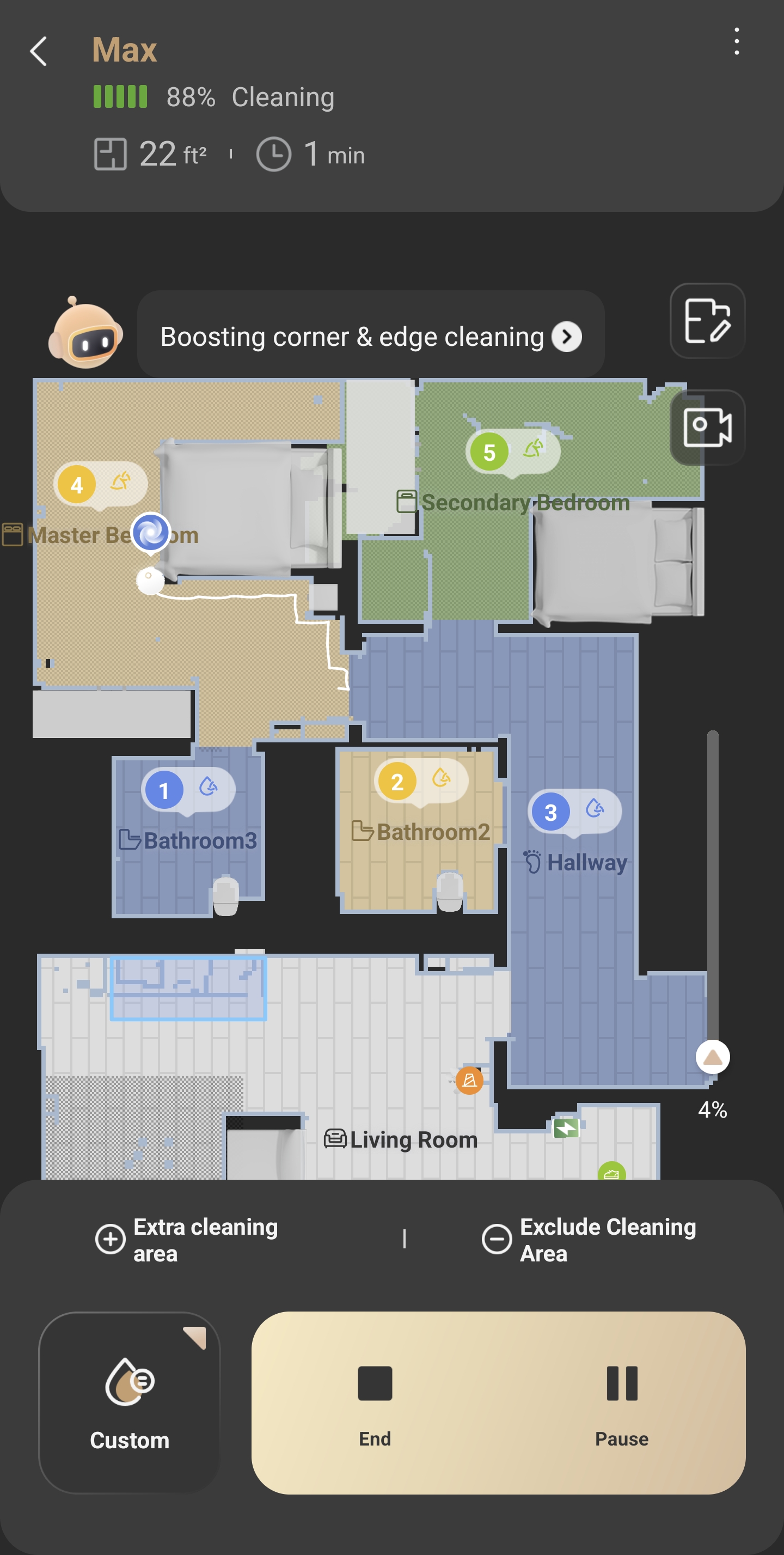
Instead of navigating to Bathroom 3 to begin the sequence, the robot bypassed the first three zones entirely and went straight to the Master Bedroom (the 4th room in the sequence). Additionally, despite the task being set to vacuum and mop, the robot left its mop pads at the base station and is currently only vacuuming.
​Attached Evidence:
I have attached a screenshot of the app taken during the cleaning cycle. It clearly shows the numerical sequence applied to the map, yet the robot's live path and location confirm it is cleaning the Master Bedroom right at the start of the job (Minute 1).
​Could you please advise if this is a known firmware bug regarding custom sequence logic, or if there is a specific workaround to ensure the robot respects the assigned order and correctly utilizes its mop pads?
Translate
You need to log in to reply. Login | Register

2 Comment

Regarding your issue, here are some troubleshooting steps that may help you resolve the problem. If your robot takes disorganized cleaning paths during daily use, please check the following points:
1. Before cleaning: Tidy up scattered items on the floor such as power strips, toys and slippers. Frequent collisions during cleaning will lead to messy navigation routes.
2. While cleaning: Promptly remove foreign objects, dust or oil stuck on the bottom drive wheels to prevent abnormal movement of the robot.
3. While cleaning: If the robot collides multiple times during operation, it will temporarily move along edges before resuming its zigzag cleaning pattern.
4. Frequent route errors: If messy paths occur constantly, upgrade the robot firmware to the latest version, reset the existing map and rebuild a new one from scratch.
5. For obstacle-avoidance models: Wipe the sensor lenses thoroughly.

For missed cleaning areas
1. The robot cannot access narrow gaps; the passage width needs to be at least 2 cm wider than the robot’s body on both sides.
2. Models equipped with ultrasonic carpet detection will avoid entering rooms when carpets are detected at doorways under mopping mode. Remove the carpet and test again.
3. Overlapped map layers may cause positioning errors and missed cleaning. Rebuild the map or restore the original map if this happens.
4. Long-pile carpets or wires placed at room entrances will trigger the obstacle avoidance system. Clear these items first before cleaning.

### For mop pad attachment issues
Check if there are foreign objects on the cleaning tray of the base station. Clear all debris and wipe the tray completely clean if any obstructions are found. Then restart the robot and reattach the mop holder manually.

If the problem persists, please send your device serial number (SN) and purchase receipt to our after-sales team for further assistance.
Email: aftersales@mova-tech.com

2026-6-27 10:12:30 GB Translate

VickyThread Starter
Hi Mova Support,
​Thanks for getting back to me with those troubleshooting steps. I’ve gone through the whole list, but the issue is definitely still happening. It really seems like a software bug with how the robot routes itself, rather than an issue with my house.
​Just to confirm your checklist: my hallway is plenty wide with no narrow gaps, all doors were wide open, and the floor was clear. I actually just rebuilt the map from scratch last week trying to fix this exact issue. The base station tray is also totally clean, and the pads attach perfectly when the robot actually decides it wants to use them.
​Here is what I think is actually going wrong. My Master Bedroom and Secondary Bedroom both have fitted carpets. I set up a custom cleaning sequence in the app:
​Bathroom 3 (Hard floor)
​Bathroom 2 (Hard floor)
​Hallway (Hard floor)
​Master Bedroom (Carpet)
​Secondary Bedroom (Carpet)
​Instead of following my order, the robot left its mop pads at the base and drove straight to rooms 4 and 5 to dry-vacuum the carpets first. It only went to 1, 2, and 3 after it finished the carpets.
​The main issue seems to be with Bathroom 3 (sequence 1). It's an en-suite, so the robot has to drive through the carpeted Master Bedroom (sequence 4) to get there. Because of the bedroom carpet, the robot refuses to leave the base station with the wet mop pads attached.
​I tested this by telling it to clean only Bathroom 3. It drove across the bedroom carpet without the pads, realized it was on a hard floor in the bathroom, and then drove all the way back to the base station just to attach the mop pads before going back. It seems like the software is completely ignoring my custom sequence so it can group the dry/carpeted rooms together first, just to avoid crossing the bedroom carpet with wet pads.
​How can I force the robot to actually obey the sequence I set in the app? Is there a setting I'm missing that lets it cross the bedroom carpet with the mop pads lifted so it can clean the en-suite first without overriding my whole sequence?
UID:BH282969
  • 3Posts
  • 0Friends
Privacy Policy|Software License and Service Agreement|DarkRoom

© 2026 MOVA Forum All Rights Reserved | Support by Discuz! X5.0 Font by MiSans

Quick Reply Back to Top Return to List