NY191888

Terrible Navigation and no possible setup for non-rectangular rooms

Last edited by NY191888 on 2026-7-18 22:19

So I got the Z60 Ultra Roller Complete today and it's a terrible disappointment.Mapping was done pretty quick but the first cleaning took ages. I replaced my Xiaomi S20+ which took about 80 minutes for a full clean.
The Z60 however... 229 minutes. That's insane.

The navigation is utterly terrible. First of all, it spends most of the time driving around doing nothing but getting lost. Even when only vacuuming it avoids low profile carpets like lava and detects alot of furniture als low profile (which it isn't). I have no clue why this thing doesn't just clean everything in one go but seperates tasks between normal, low profile and carpet cleaning. There is a carpet? Raise the mop, low profile furniture? Lower the lidar. But grouping up those actions is an utter waste of time.

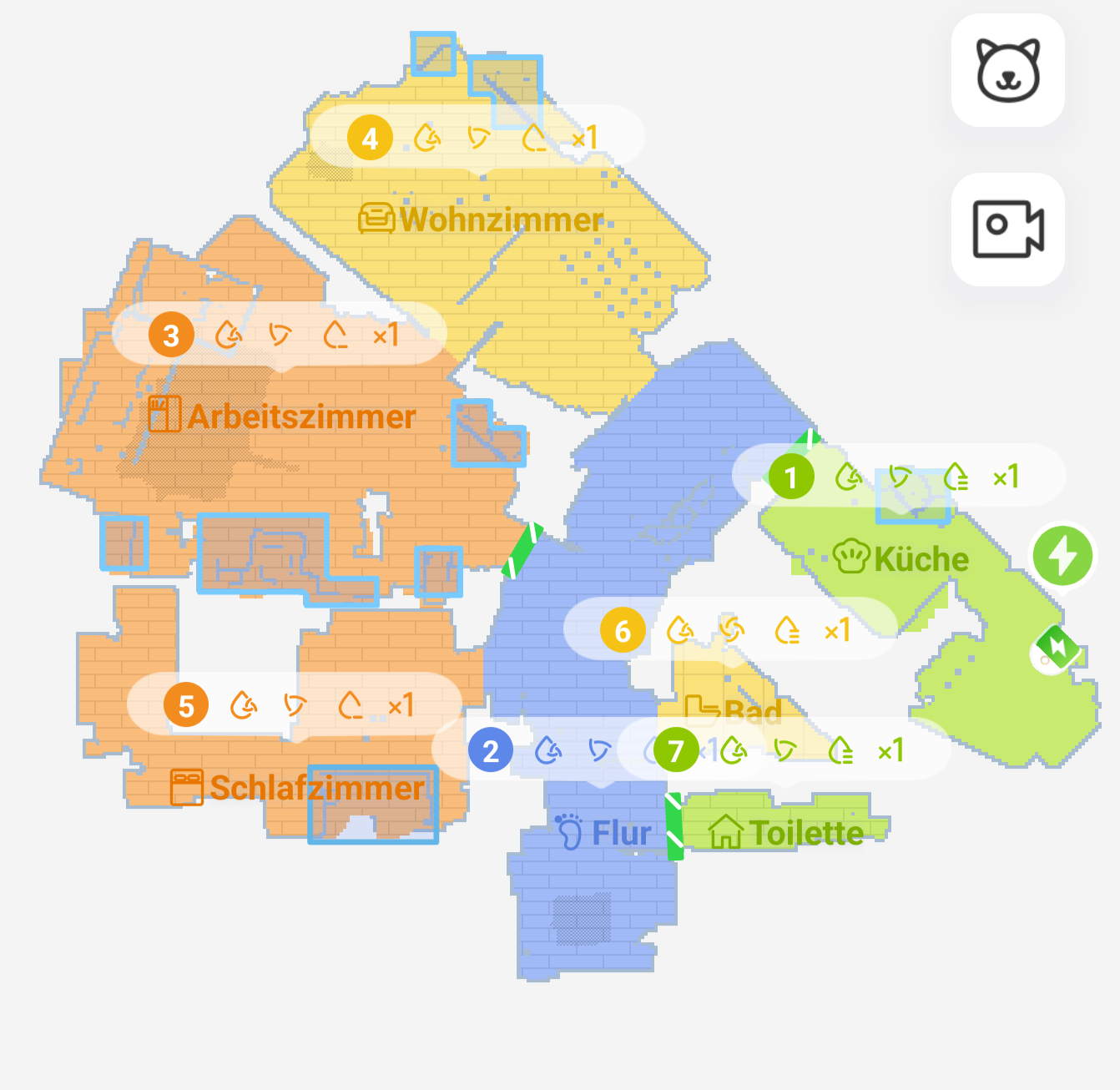
Now that the first cleaning was done somewhat successfully, I tried to adjust the map and I wonder why I'm not able to set up zones that are anything else than rectangles orthagonally to a random surface of the flat. This also leads to unoptimized paths.

Every room should be able to get it's own cleaning direction. Just putting a vertical or horizontal pattern over the entire flat does not cut it. Especially when using the floor direction mode, this would come in handy.

As for now, my low profile furniture boxes are placed randomly and do not reflect reality.

I really do hope that the next full cleaning will be alot faster, else this is the worst investment in ages.
You need to log in to reply. Login | Register

1 Comment

Good morning. Since your robot is new, we recommend updating both the Mova App and robot firmware to the latest versions first. Also, could you share the size of your house? Larger floor areas will naturally extend total cleaning time.

Regarding the messy navigation paths you described, we sincerely apologize for the inconvenience and have listed troubleshooting steps for you below:

1. Check if any hair or debris is wrapped around the drive wheels.
2. Inspect the rotating LDS LiDAR unit for tangled hair or foreign objects blocking smooth rotation; clear any obstructions found.
3. Make sure there are no raised stickers or bulky items stuck on top of the robot body.
4. Tap the front bumper gently to verify it bounces back freely without jamming.
5. Wipe off dust and fingerprints from the linear laser sensor and AI obstacle recognition cameras.
6. Check for oily or slippery substances on the floor, which cause wheel slippage and erratic movement.
7. Remove oil residue from drive wheel surfaces—slipping wheels will disrupt the cleaning route.
8. Reboot the robot after completing all the above checks and run a cleaning cycle again.

If these steps fail to resolve the issue, please reach out to MOVA after-sales support for further assistance.

For low-hanging furniture detection, you may mark those zones as low-clearance areas on your map. Our R&D team will keep optimizing the obstacle recognition algorithms in future updates. Please keep using the robot and observe its performance. If you encounter any more navigation or detection glitches later, feel free to send us relevant footage and a detailed description of the issue, and we will analyze it thoroughly for you.
2026-7-19 07:33:05 GB Translate

UID:NY191888 GB
  • 1Posts
  • 0Friends

© 2026 MOVA Forum All Rights Reserved | Support by Discuz! X5.0 Font by MiSans

Quick Reply Back to Top Return to List